Selling stock photos is a hard way to earn money. The large agencies each hold hundreds of millions of images, and more arrive every day. A single download often earns well under a dollar. So the honest first question for a semi-professional photographer is not how to sell, but whether to bother at all. Is it worth adding hundreds of your photos to that pile, or would your evenings earn more somewhere else?
And yet you keep taking photos, and most of them end up sitting in your catalog. A few are exceptional: the frames you would rather print, exhibit, or keep, and might never offer as stock. Behind them, though, are hundreds of solid, well-edited pictures of markets, streets, landscapes, and people at work. In the catalog they earn nothing. As stock, each one is a small chance of a sale.
If you do decide to sell, it will not be a few photos a month. To give a portfolio a fair chance, you submit in volume: hundreds of photos, usually to several agencies at once. Then the question changes again. It is no longer whether your photos are good enough, but how you manage hundreds of them: which photo went where, which agency wanted editorial captions, which upload actually arrived, and which rejection you still meant to fix. Sooner or later there is a spreadsheet, and with it the realization that you are running a small distribution business with the tools of a hobby.
This article is about that business side. It starts with how contributors actually sell today, because that explains the problem better than any feature list. Then it follows one photo through a connected workflow in Lightroom Classic, and explains why each piece of it is deliberately small.
If you are a typical contributor
Market research has a name for the photographer this is written for: the semi-professional, side-income photographer. If that is you, photography is not your job, but it is more than a hobby.
- You shoot on a rhythm, around a day job, not in occasional bursts.
- You think of your pictures as a portfolio of commercial series rather than a folder of favourites: travel, local life, food, people at work, events.
- You write your own captions and keywords, deal with model releases and visible brands, and sort out tax forms and payouts yourself.
- The income matters. It pays for the gear and the trips, perhaps more, but it does not pay the rent.
A contributor survey, described below, fits this picture well. Most respondents spent fewer than eight hours a week on stock, and 8 to 16 hours was the next largest group. About 28% earned under $100 a month, more than 35% over $500, and 15% over $2,000. Real money for some, but the sample was experienced and self-selected, so a newcomer should expect less.
What this photographer lacks is not skill. It is time. With a few hours a week, every hour spent on admin is an hour not spent shooting.
One agency, or many?
As a semi-professional photographer, you face an early choice. You can go exclusive: apply to one agency, such as Getty Images and iStock or a curated collection like Stocksy, and in return get a better royalty share, more visibility, and a single place to manage. Or you can stay non-exclusive and offer the same pictures through several agencies at once, trading a lower share per sale for more buyers and less dependence on one company's royalty decisions.
Exclusivity is selective and ties your whole portfolio to one set of rules, so most side-income photographers take the second road. The best contributor-side evidence on this is a 2024 survey of about 250 microstock contributors from 59 countries. It is self-selected, so treat it as a direction rather than a census, but the pattern is clear: most contributors distribute through more than four agencies, non-exclusively. Adobe Stock and Shutterstock are the reach layer; Getty Images and iStock are the selective global network; Alamy, Dreamstime, and others serve particular kinds of pictures and buyers.
And this is where the challenge starts. Every agency you add brings its own upload route, its own metadata rules, its own review, and its own place to check what happened.
Scale cuts both ways. Shutterstock alone recorded 453 million paid downloads in 2025, but it also describes a network of millions of creators. Getty reports more than 600,000 content creators. Buyers are plentiful; so is competition. In the same survey, consistency and niche selection were the factors contributors most often linked to earnings. The photographers who do well keep feeding the pipeline, week after week.
Put those facts together and you get the real cost of stock photography. Royalties per download are small, so the effort you spend per image matters. And every extra agency multiplies that effort: another metadata style, another upload route, another place to check. Multi-channel distribution pays in reach and costs in administration.
Where your hours actually go
Time a typical week and the editing is rarely the problem. The hours go into four other kinds of work:
- Deciding. Is this a stock photo or an exclusive print? Commercial or editorial? Commercial at one agency and editorial at another, because their rules differ?
- Describing. Titles, captions, and keywords, written differently for commercial and editorial use. Editorial captions need a dateline and facts; commercial ones must avoid brands and names.
- Delivering. Exporting, uploading, and making sure nothing is sent twice.
- Remembering. What went where, when, and what came back.
There are good tools for parts of this. Most multi-agency uploaders, though, are separate applications or cloud services: you export your photos out of Lightroom, re-describe them somewhere else, and keep a second record of what happened. Yet you already have a place that knows every photo you own. The rest of the work can happen there too.
Why we built Expolumi
Expolumi started in exactly that position. Its maker is a former software developer and hobby photographer with a Lightroom Classic catalog full of edited photos that nobody had ever seen. Trying stock was the obvious next step, and the photos turned out to be the easy part. Every agency added an upload route, a metadata style, and another place to check, and before long the spreadsheet appeared.
The tools that existed meant leaving Lightroom. We wanted to stay: to make the decisions, write the descriptions, send the files, and keep the record in the same catalog where the photos and edits already were. Nothing on offer did that, so we built it as a few small Lightroom Classic plug-ins, first for one catalog, and then for other contributors with the same problem.
The idea: the catalog is the record
The Expolumi workflow rests on three decisions.
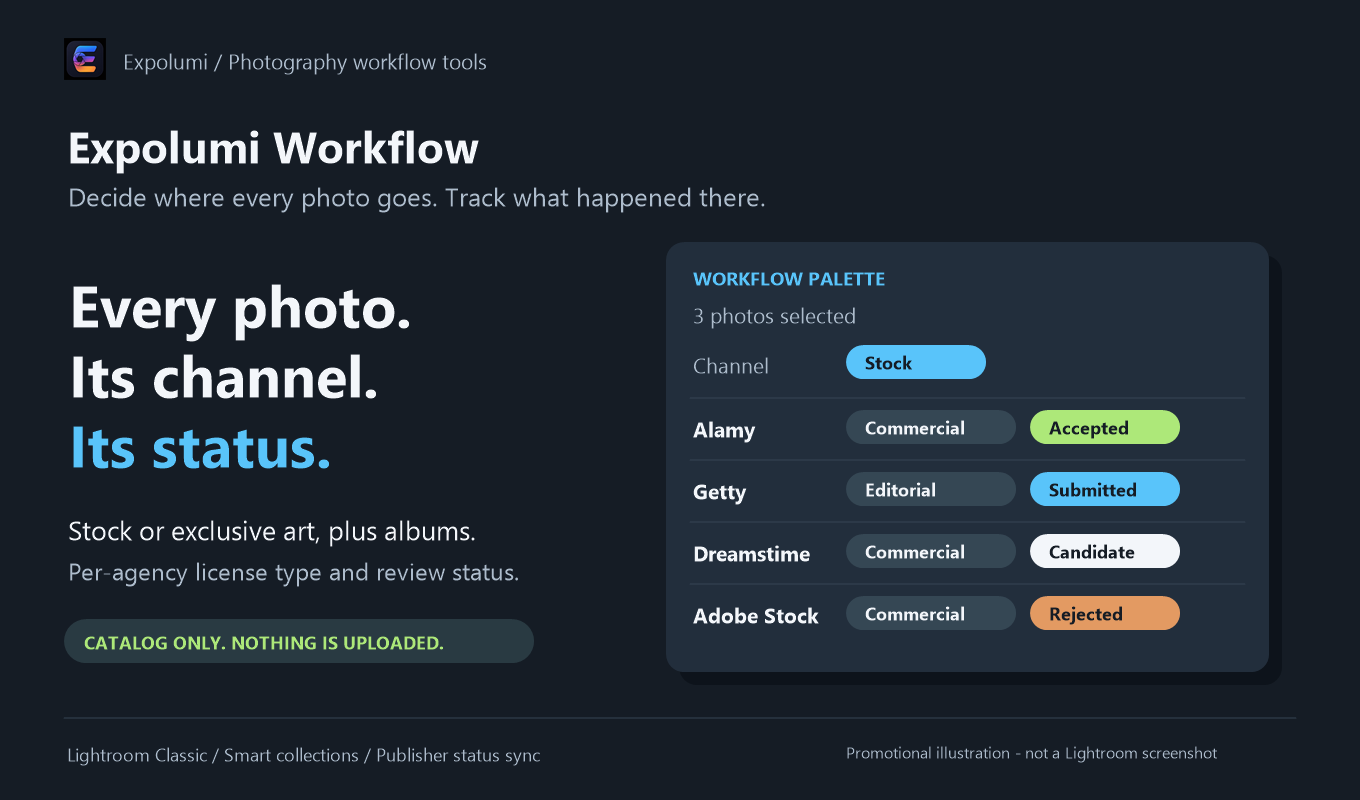
One source of truth. Lightroom Classic is where your photos, edits, and metadata already live, so it is also where the decisions and statuses should live. No spreadsheet, no second library, no cloud account.
A human at every gate. Nothing is uploaded, submitted, or described unless you choose it. Suggestions are drafts; queues wait for your click.
An honest last mile. Agencies do not let tools finish a submission for you, and they do not report review results back. So the tools say what they did: "published" means transferred, not accepted. Categories, releases, and the final submit happen on the agency's website, where they belong.
Following one photo
Take a real frame: a raw file of a morning fish market, with vendors and a few recognizable faces. Good stock material, but not for commercial use without model releases.
1. Plan: decide where it goes
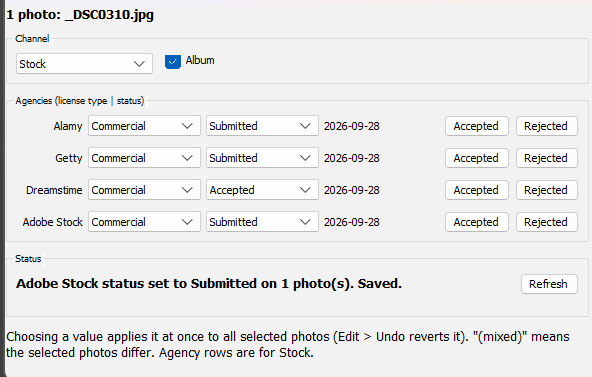
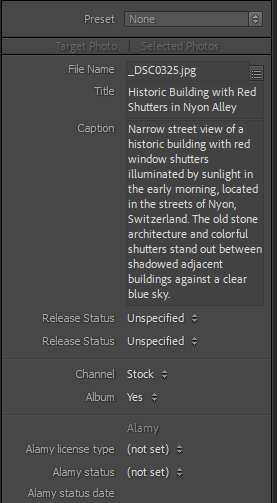
In Expolumi Publishing Workflow's palette, you set the channel to Stock. For Alamy and Dreamstime you choose Editorial; the moment you pick a license type, the photo becomes a Candidate at that agency, with today's date. A landscape from the same morning would get Commercial everywhere, and a photo you want to sell as a limited print would be marked Exclusive art and never reach an agency at all.
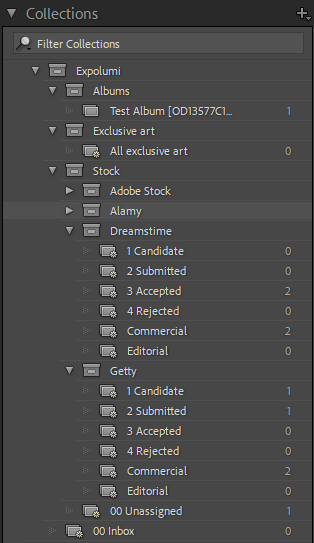
These fields live in the catalog, not in keywords, so they never leak into the files a buyer receives. Smart collections turn them into to-do lists: Alamy candidates, Dreamstime rejected, unassigned stock.
2. Describe: write it for its purpose
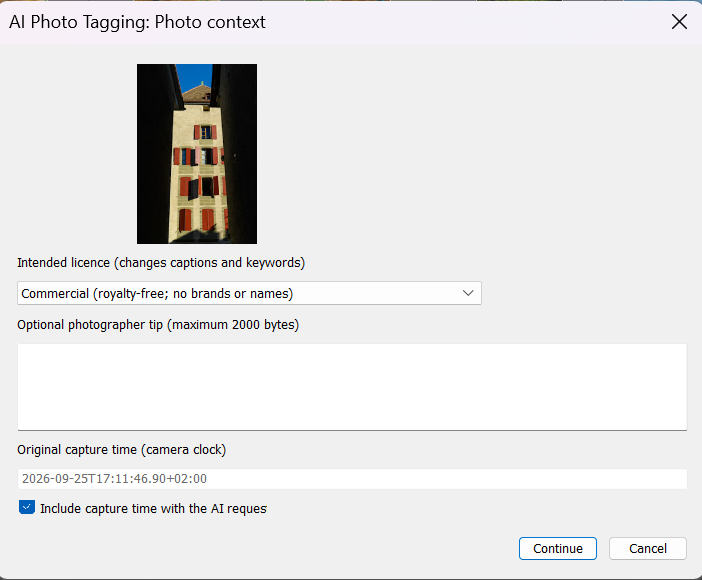
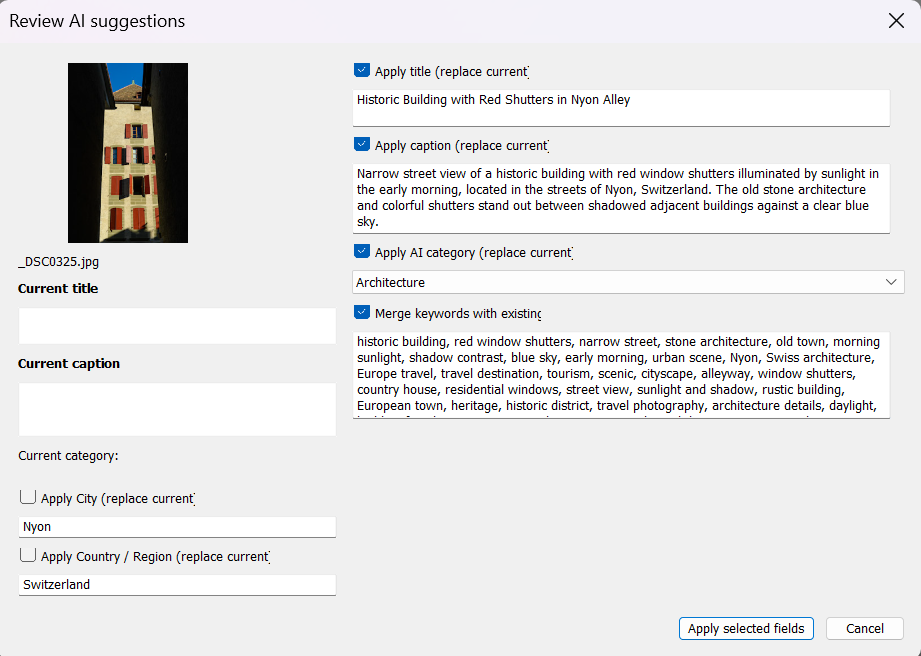
Next, Expolumi AI Photo Tagging drafts a title, caption, and keywords from a small preview and your own short note about the scene. Because Workflow already knows this photo is editorial, the editorial mode is preselected: the caption starts with a dateline and sticks to facts, and nobody is identified from their appearance. You review every suggestion, rewrite what is wrong, and apply only what you accept. The AI runs on your own Microsoft Foundry resource, so you see and pay for exactly what it uses.
3. Publish: send it, once
Workflow's Sync Publisher Status puts every Candidate into the right publish service: the Alamy and Dreamstime publishers, the Getty publisher that prepares a Dropbox batch for Getty's contributor portal, and Lightroom's own Adobe Stock service. Nothing moves until you click Publish. From version 1.1, the publishers render a full-size JPEG from the raw file with your edits and metadata, so there is no export-and-reimport step and no second copy in the catalog to keep in sync. Each publisher remembers the file names it has sent and refuses a duplicate.
Then you finish the submission on each agency's site. That part stays manual on purpose.

4. Track: know where it stands
The next Sync marks the photo Submitted at each agency, with the date. When the reviews come back, one click records Accepted or Rejected. A few weeks later, the rejected collection for an agency shows you the common cause, whether noise, a missing release, or a trademark, and you can fix a batch at once instead of rediscovering the problem photo by photo.
And the photos you keep for yourself
Workflow also has an Album mark, independent of the channel. A stock photo can still belong in the family album. The free OneDrive Album preview adds those photos to your personal OneDrive albums without uploading anything again.
Pluggable, not a suite
This could have been one big application. Instead it is six small plug-ins, because contributors don't all work the same way. If you only upload to Dreamstime, the Dreamstime publisher is all you need. If you write your own keywords but lose track of submissions, Workflow on its own solves that. Each plug-in installs separately, works without the others, and simply does more when its neighbours are there: Workflow tells the tagger which licence you intend, the publishers tell Workflow what was sent.
Everything they share goes through your catalog. There is no Expolumi server in the middle and no account to create, and if you remove a plug-in, your photos and their embedded metadata stay exactly where they are.
What it doesn't do (yet)
The same research that shaped the workflow also shows its gaps, and they are worth naming:
- Releases. Model and property releases are one of the biggest reasons commercial submissions fail. None of the plug-ins records them yet.
- Shutterstock. It is one of the two largest agencies, and there is no Expolumi publisher for it.
- Review results. The agencies covered offer contributors no API for acceptance status, so Accepted and Rejected are still a click you make.
- Sales. Royalty statements and reconciliation are out of scope.
Stock photography will not get less competitive. What you can control is how much of your week goes into the admin around it. Put it all back into the catalog, and an evening of spreadsheet work becomes a few minutes of decisions.